WhatsApp bookkeeping for South Africa

Scan receipts on WhatsApp.
Get SARS-ready books.

Photograph any slip and send it on WhatsApp. Snap-a-Slip reads the merchant, total, 15% VAT and date, sorts it into the right category, and files it for SARS. No app, no spreadsheets.

  • Free for 15 receipts/month
  • POPIA-compliant
  • Cancel anytime
receipts snapped and sorted for South African freelancers and businesses
Under a minute
From photo to filed receipt
15% VAT
Pulled out on every slip, automatically
5 years
SARS asks you to keep receipts this long. We store yours while your account is active.
See it work

From shoebox to sorted.

This is the actual product. Every screen below is what you get after you send one photo.

Step 01AI extraction

Every figure, pulled from the photo.

Send a slip and within seconds it comes back as clean data: merchant, date, total, 15% VAT, currency and category. Each field shows a confidence score, and the original photo stays attached.
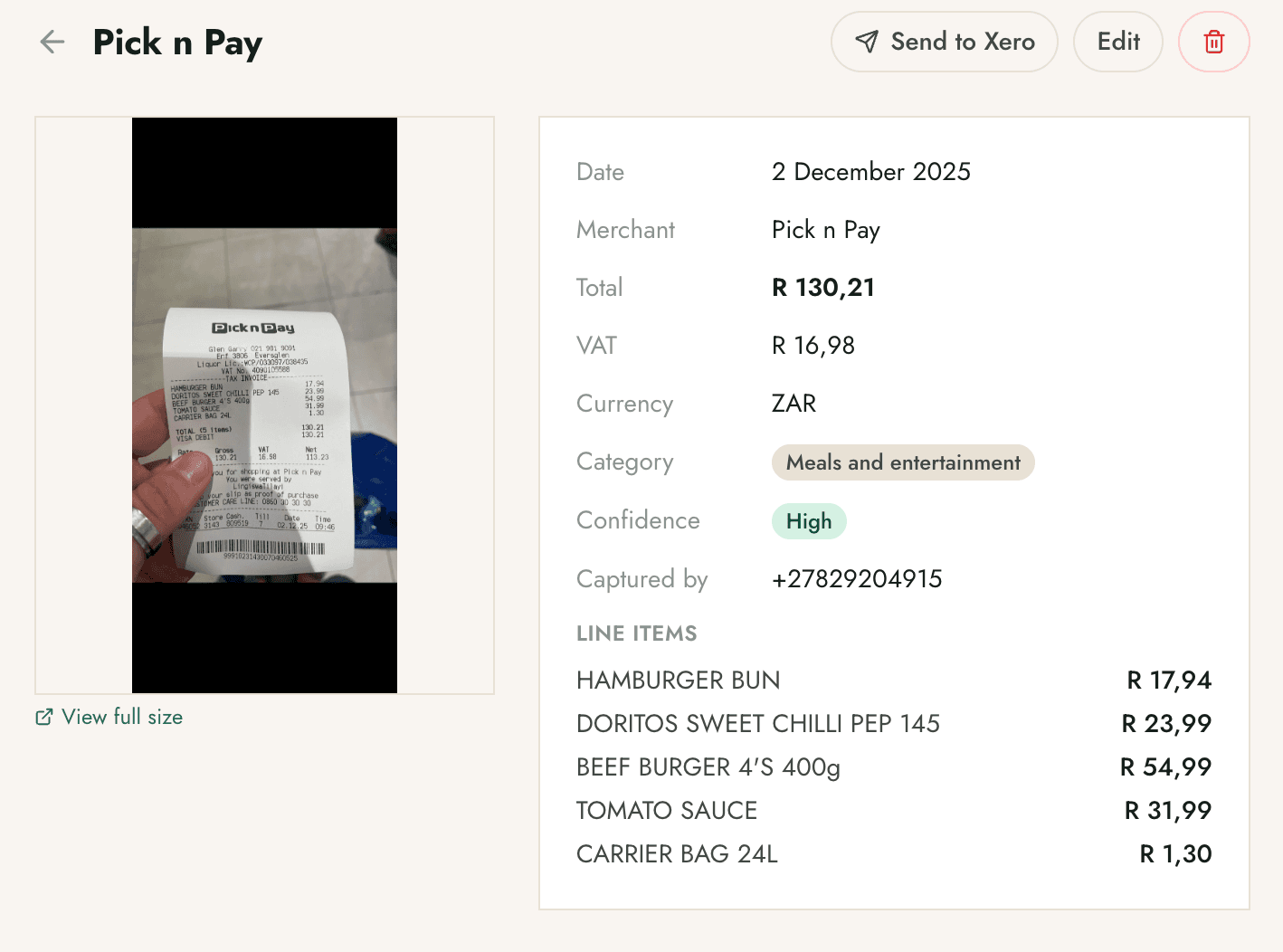
  • VAT split out. The 15% line is separated from the total, ready for your SARS return.
  • Line items captured. A grocery run with twelve lines comes back line by line, not as one lump.
  • One tap to your books. Push a slip straight to Xero or QuickBooks with the photo attached.
Snap-a-Slip dashboard showing a Pick n Pay receipt with extracted merchant, date, total R130.21, VAT R16.98, category and per-line items.
Real extraction view · merchant, VAT and line items
Step 02Auto-categorisation

It files itself, and learns from you.

Every slip lands in the right category on its own. Snap-a-Slip ships with a full set of South African categories, and when you correct one, it remembers for next time.
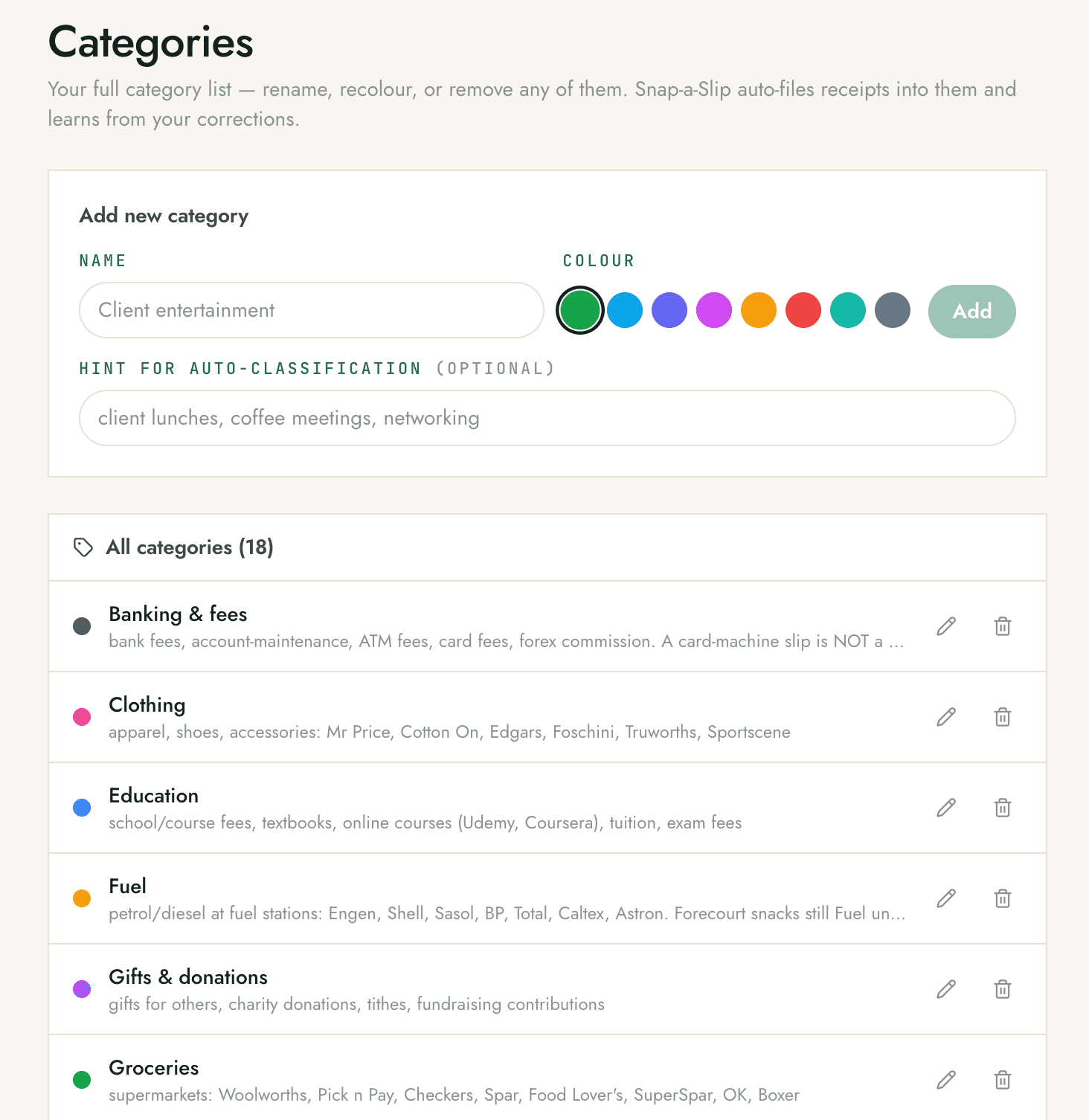
  • Built for SA. Groceries, fuel, banking fees, medical and more, with vendor hints baked in.
  • Make it yours. Rename, recolour, or add categories like "Client entertainment" in seconds.
  • Learns on correction. Move one receipt and the next from that vendor goes to the right place.
Snap-a-Slip categories screen listing 18 South African expense categories with colour tags and auto-classification hints.
18 categories out of the box, fully editable
Step 03Monthly summary

Your whole month, at a glance.

Total spend, receipt count, spend by month and spend by category, all updating as your slips come in. No spreadsheet to build, no month-end scramble.
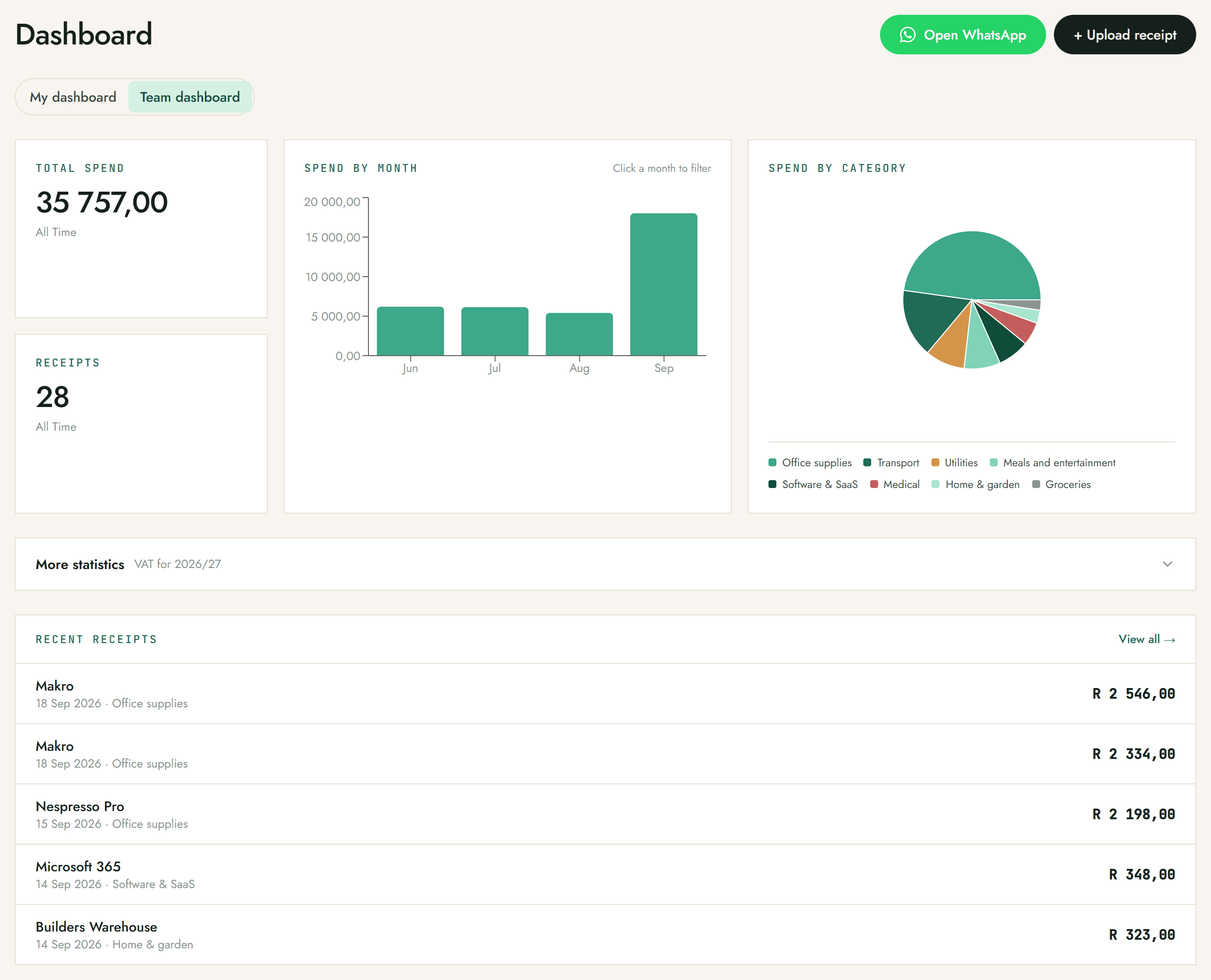
  • Spend by category. See where the money actually goes, broken down and totalled.
  • Always current. The dashboard updates the moment a new slip is processed.
  • Open WhatsApp anytime. Jump back to the chat or upload a receipt straight from the dashboard.
Snap-a-Slip dashboard showing total spend, receipt count, a spend-by-month bar chart and a spend-by-category pie chart, with recent receipts below.
The dashboard, updating in real time
Step 04Export anywhere

Hand it to your accountant, any way they want.

Push slips live to Xero or QuickBooks, download a CSV or a formatted PDF report, or grab a CSV shaped for Sage. Need the originals? Pull a ZIP of every receipt photo for the period.
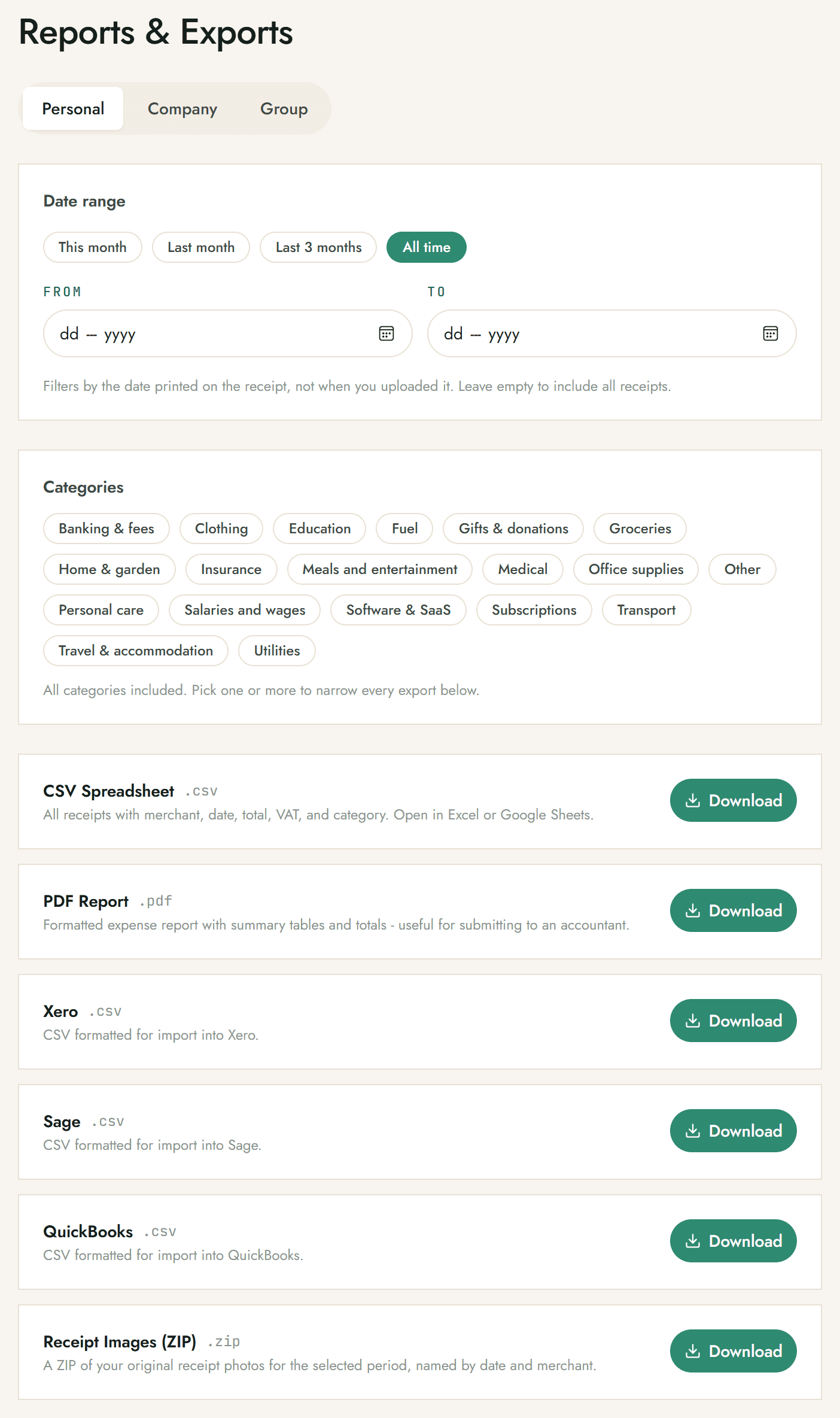
  • Live Xero and QuickBooks. Slips arrive in Xero or QuickBooks with the source photo attached, ready for review.
  • CSV and PDF for everyone. Open in Excel or Google Sheets, or send the PDF straight to your bookkeeper.
  • Sage CSV. Export a CSV formatted to import cleanly into Sage.
Snap-a-Slip Reports and Exports screen with a date and category filter and downloads for CSV, PDF report, Xero, Sage, QuickBooks and a ZIP of original receipt images.
CSV, PDF, Xero, Sage, QuickBooks, ZIP
Step 06Departments and groups

Split a business into groups.

On Business, organise a workspace's receipts into groups, like departments, branches, sites or projects, each with its own spend total. Done with one for the season? Archive it and it drops out of the WhatsApp picker while keeping every receipt and export.
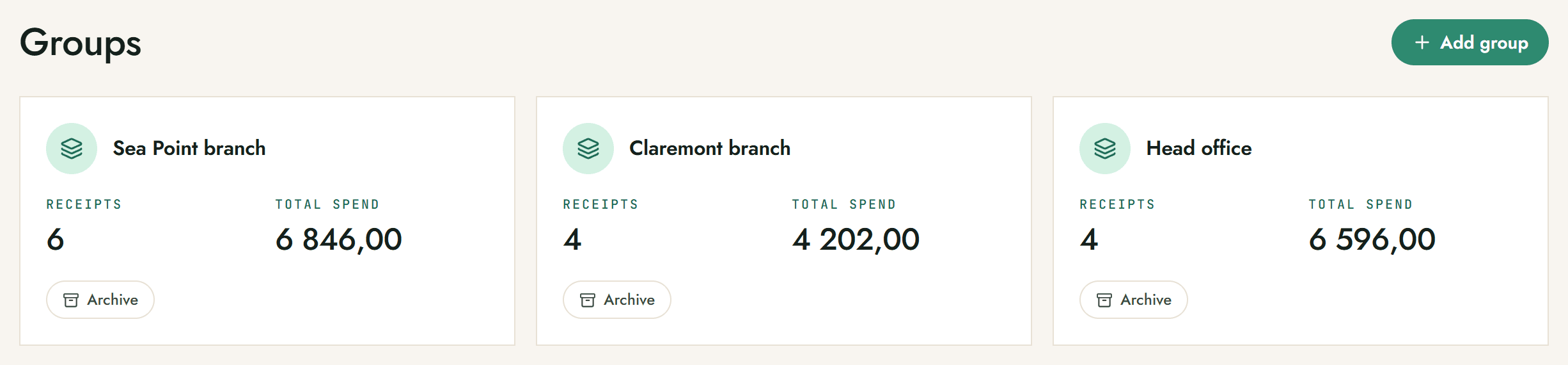
  • Spend per group. Each group shows its own receipt count and total spend at a glance.
  • Departments or cost centres. Group by branch, site, team or project, whatever matches how you report.
  • Archive, don't delete. Archiving hides a group from the WhatsApp picker but keeps its receipts and exports intact.
Snap-a-Slip Groups screen showing Sea Point branch, Claremont branch and Head office, each with a receipt count, total spend and an Archive button.
Groups with per-group spend, archivable
Step 05Teams and accountants

Add your team or your bookkeeper.

Invite people by WhatsApp number and everyone snaps into the same workspace. Owners see team activity and spend per member. Your accountant gets their own login and your receipts in real time.
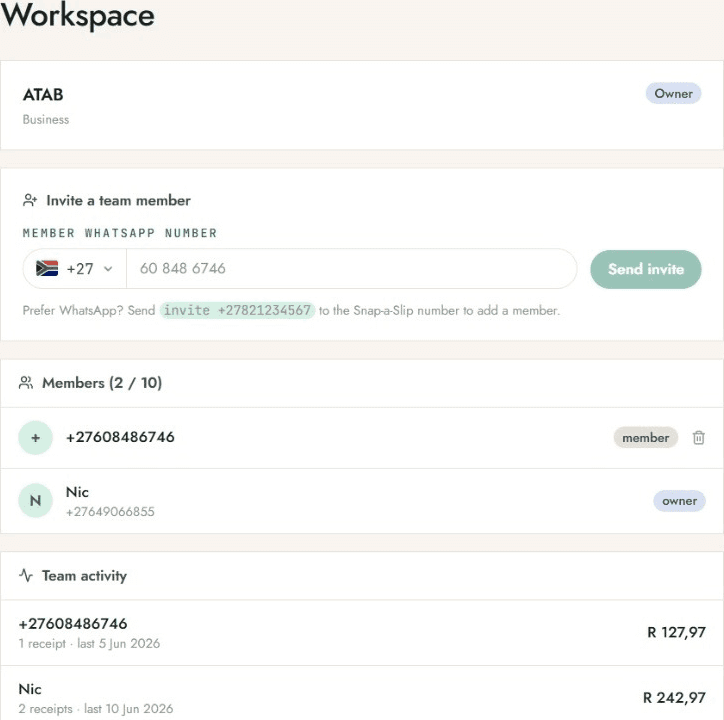
  • Invite by number. Send an invite to a teammate's WhatsApp number and they're in.
  • See who spent what. Team activity shows receipts and totals per member.
  • Bookkeeper access. Give your accountant a login to the same extracted slips, live.
  • Groups for departments. Organise a Business workspace's receipts into groups, like departments, sites or projects.
Snap-a-Slip workspace screen showing a business with two members invited by WhatsApp number and team activity totals.
One workspace for the whole team
For accounting & bookkeeping firmsPractice Partner

One login, your whole book of clients.

Run an accounting or bookkeeping practice? Practice Partner gives you one Snap-a-Slip login that switches between every client company. Each client's own staff capture receipts over WhatsApp exactly like any business, and receipts post as draft bills straight into that client's own ledger.

See Practice Partner pricing
  • Each client's own ledger. Connect each client's own Xero organisation, Sage business or QuickBooks company.
  • Import from Xero in bulk. Bring your client list straight in. Each Xero organisation becomes a client.
  • One consolidated bill. A single monthly invoice across your whole book, with volume discounts as you add clients.
The detail

The bits that make it stick.

Reads any slip

Till receipts, fuel, parking, restaurant tabs, PDFs. Crooked, crumpled or faded, the OCR is tuned for SA vendors.

15% VAT, calculated

The VAT line is pulled out separately on every slip. Month-end and SARS submissions stop being a guessing game.

Confidence on every field

Each extracted value carries a confidence score, so you know which ones to glance at before you file.

Fix it in a tap

Wrong merchant or amount? Click the field on the dashboard and edit. The bot learns from your corrections.

Your receipts, kept

Originals stored while your account is active. Download a ZIP of every photo, named by date and merchant.

Cancel in one word

No contract, no lock-in. Type "cancel" on WhatsApp. Your data stays accessible through your final billing month.

Built for South Africa

Tax-ready, and yours to keep.

SARS-ready
Clear, unaltered photos that hold up at audit, with VAT split out for your return.
POPIA-compliant
A South African product built for local data rules. Export or delete everything anytime.
Your data, your call
Receipts are never sold or shared. Cancel and your data stays accessible through the month.

Read our guides on SARS, VAT and record-keeping, learn how receipt capturing works, compare the ways to capture receipts in South Africa, or read who we are and who builds this.

Pricing

Start free. Unlimited from R99.

Free for your first 15 receipts a month, resetting monthly. Upgrade when you outgrow it.

Most popular
Pro
R99
per month · billed monthly · VAT inclusive
  • Unlimited receipts via WhatsApp
  • Merchant, date, total, 15% VAT and line items
  • Auto-categorisation across all categories
  • Live Xero and QuickBooks push, plus Sage CSVs
  • CSV, PDF and receipt-image exports
  • Monthly spend summaries
  • POPIA-compliant data handling
Start free on WhatsApp
No card today · Cancel anytime
FAQ

Quick answers.

Do I need to download an app?

No. Snap-a-Slip lives entirely on WhatsApp. Save the number, send a slip, done. The dashboard is a website you only open when you want to review or export.

Will SARS accept a photo of my slip?

Yes. SARS accepts photographed receipts as long as they are clear, complete and legible at audit. A clean photo is often more readable than the original thermal slip, which fades over time.

Does it calculate VAT?

Yes, automatically. The 15% VAT breakdown is pulled out separately from the total on every extracted slip, which makes month-end and year-end VAT submission straightforward.

What if the AI gets something wrong?

Click into the field on the dashboard and edit it. A confidence score is shown next to every extracted field, so you know which ones to double-check first.

What does it cost?

Free for your first 15 receipts a month, which resets monthly. Pro is R99/month for unlimited receipts and all exports. Business is R399/month for up to 10 users. Enterprise is custom-priced for larger teams and multiple businesses, just get in touch. Practice Partner, for accounting and bookkeeping firms, is one consolidated monthly bill across your whole client book with volume discounts, contact us for a quote.

Snap your first slip today.

Free for your first 15 receipts. No card, no signup form. Just a WhatsApp message.

Start free on WhatsApp